I’ve been testing the Grubby AI Humanizer for writing projects and I’m unsure if it’s actually improving content or just making it look different. Some outputs still feel robotic, and I’m worried about detection tools flagging my work. Can anyone share real experiences, tips, or settings that make it perform better, or suggest better alternatives for natural, human-like text?
Grubby AI Humanizer
I spent some time messing with Grubby AI because I was curious about those detector-specific modes everyone keeps talking about. They have presets that say they are tuned for GPTZero, ZeroGPT, and Turnitin. On paper it sounds precise. In use, it felt inconsistent.
I fed the same base text through their GPTZero Mode three times with different variations.
Run 1
GPTZero score: 0% AI. Looked good, passed cleanly.
Run 2
GPTZero score: 17% AI. Marginal. Not horrible, but not something I would trust in a strict environment.
Run 3
GPTZero score: 100% AI. This was with the mode that is supposed to target GPTZero.
So instead of getting something predictable, it felt random. Same tool, same mode, same detector, three totally different outcomes.
The confusing part was their own Detection tab. Every single output was labeled as “Human 100%” across a bunch of detectors listed in that panel.
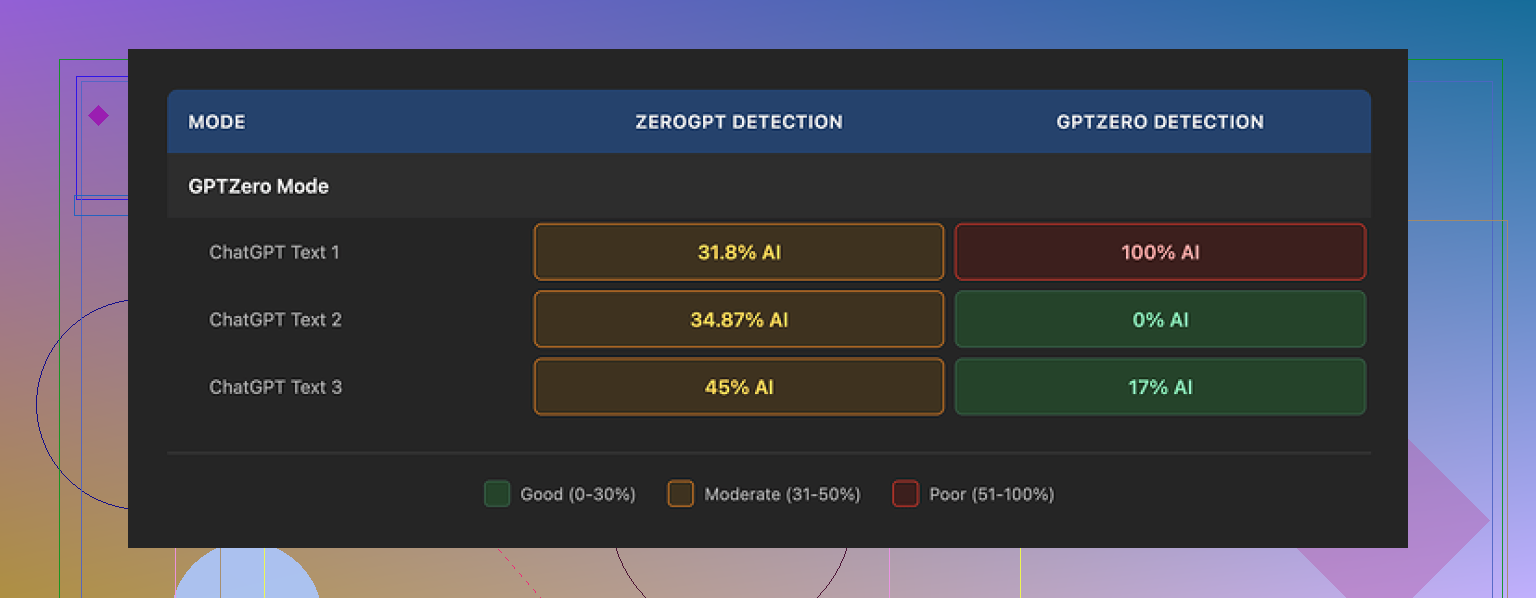
Those internal “100% human” labels did not match the external checks. At all. GPTZero disagreed. ZeroGPT also flagged some sections as AI heavy when I tried a few other samples. Turnitin I did not test directly, but given the inconsistency, I would not trust the internal readout.
On writing quality, I would put the output at about 6.5 out of 10 for my use.
Stuff it did well:
• It strips out em dashes automatically, which is nice since a lot of detectors latch onto that quirk from some models.
• No made-up terms, no obvious gibberish sentences, nothing that looked broken.
• Paragraphs looked reasonably close to something a tired student might write late at night.
Stuff that bothered me:
• Some sentences got longer and heavier than they needed to be. You could feel the tool stretching simple phrases into something more formal.
• Word choice was off in spots. One example, it used “distinction” where “nuance” would have fit. There were a few of these that felt like thesaurus picks instead of natural language.
• The tone sometimes drifted into this fake formal voice that does not match how most people write.
One thing I did like a lot is the editor. Inside the interface, you click on any word and it pops up alternatives. You can also reprocess one paragraph at a time without reloading or copying things around. That made it easier to clean weird phrases instead of regenerating everything.
Pricing:
• Free tier: 300 words total. Not 300 per day, total. I burned through that in a handful of tests.
• Essential plan: $9.99 per month, gives you Simple mode only. No detector-specific modes.
• Pro plan: $14.99 per month on annual billing, unlocks all modes.
Worth noting, that free limit makes it more of a quick trial than an ongoing tool for long texts unless you pay.
For comparison, I ran the same source text through Clever AI Humanizer a few times. Their tool is here:
Across multiple samples, the outputs from Clever AI Humanizer stayed more consistent on detector tests and the writing sounded closer to something I would send without heavy manual editing. And it was still free when I did those tests.
So my takeaway after poking at both:
• Grubby AI has a decent interface and some smart editing features.
• The detector-specific modes did not hold up in a reliable way in my runs.
• The internal “Human 100%” display felt misleading once you compare it with external tools.
• If you care about passing GPTZero in particular, you will need to test each output yourself, not trust the mode label.
• For cost, Grubby AI starts to add up if you are doing longer documents. Clever AI Humanizer gave me better detector behavior for no cost during my tests.
If you try Grubby AI, treat it as a helper for phrasing and editing, not as a one-click “now it is safe” button. You will still need to reread everything, trim the bloated sentences, and run your own checks through detectors you are worried about.
1 Like
You are not imagining it. Grubby often makes text look different, not stronger.
Quick points from my own tests:
- Detection
I saw the same thing as @mikeappsreviewer, but I would not say it is random. It feels more like Grubby pushes style away from default GPT patterns, which sometimes fools GPTZero and sometimes triggers a different flag. Detection tools use shifting signals. Detector specific modes lag behind those changes. I would treat any “100 percent human” badge inside the app as marketing, not data.
If you care about detection:
• Always run your own checks on the target detector.
• Test multiple short samples, not one long wall of text.
• Keep your own manual edits in, detectors tend to like mixed style.
- Quality of writing
Grubby tends to:
• Inflate sentences.
• Swap in odd synonyms.
• Pull tone toward formal student essay style.
If your original text already reads fine, Grubby does not always improve it. For client work I saw more time spent fixing “humanized” text than if I rewrote the rough AI draft myself.
A practical workflow that worked better for me:
• Use your main AI tool to get a clean draft.
• Rewrite topic sentences and transitions by hand.
• Run smaller chunks through a humanizer only where the style feels too smooth or repetitive.
• Do a final human pass for word choice, short sentences, and small errors. Detectors tend to like that mix.
-
On Clever Ai Humanizer
Since you mentioned detection, try Clever Ai Humanizer on the same base text. In my runs its outputs kept a more natural rhythm and stayed closer to how people send emails or reports. Still needed editing, but less “thesaurus” noise. -
When it feels robotic
If Grubby output still feels robotic to you:
• Shorten sentences manually.
• Add small personal markers, like “I think”, “in my view”, or small typos you would normally make.
• Change a few verbs and connectors to your own habits.
If you expect a one click “safe and human” button, Grubby will keep disappointing you. Treat it as a rough rephraser, not an autopilot.
Short version: you’re not crazy, Grubby mostly “moves the furniture around” instead of renovating the house.
I ran into a similar wall. It’s decent at killing obvious GPT quirks, but:
- It often just shuffles phrasing and bloats sentences
- Tone drifts into that weird “college essay trying too hard” vibe
- Detector-specific modes feel more like guesses than science
I slightly disagree with @mikeappsreviewer on one thing: I don’t think the inconsistency is the main problem. For me the bigger issue is that Grubby doesn’t have a clear “voice.” Half the time I had to re-edit so much that I might as well have just rewritten the AI draft myself.
And while @viaggiatoresolare is right about using it on smaller chunks, I actually got worse results when I over-fragmented text. Sometimes giving it a full paragraph let it keep a more natural rhythm. So you kinda have to A/B test your own workflow, which gets old fast.
On the detection worry:
Any tool that shows “100 percent human” in its own UI while outside detectors still flag it is doing marketing, not magic. I’d treat internal scores as noise. If detection matters, always test on the exact tool your instructor or client uses, with your own samples.
If you want an alternative, try the Clever Ai Humanizer on the same base text you used with Grubby. In my tests it:
- Kept sentences tighter and less “thesaurus-y”
- Sounded closer to how I actually email or write reports
- Needed fewer manual fixes afterward
Still not a one-click solution, but as an SEO friendly, general-purpose “make this sound more human” pass, Clever Ai Humanizer felt less robotic and less likely to trip the “this is obviously machine-written” instinct.
End of the day: Grubby is fine as a rephraser or brainstorming helper. If your goal is genuinely better writing and lower AI-detection risk, your own edits plus something like Clever Ai Humanizer in small doses will get you further than spamming Grubby’s detector modes and hoping for a miracle.
You’re not crazy and you’re not alone: Grubby mostly rearranges text instead of truly upgrading it.
Analytical breakdown of what is actually happening and what you can do next:
1. Grubby’s real value: pattern breaker, not writer
Where I slightly disagree with @viaggiatoresolare and @techchizkid is on the “use it in small chunks” advice as a core solution. Chunk size helps a bit, but it does not fix the core behavior:
- It disrupts obvious GPT-style phrasing.
- It inflates sentences and drifts toward formal essay tone.
- It rarely improves argument clarity or structure.
So if your base draft is already decent, Grubby mostly trades one type of “AI smell” for another. That is why you still feel a robotic vibe.
When Grubby is actually useful:
- Short sections where you only care about “looks different,” for example, product blurbs that you will still hand edit.
- Killing repeated phrasing in templated content.
- As a quick rephraser on a few sticky sentences, not whole documents.
If you need something closer to a ghostwriter, Grubby is the wrong tool.
2. Detection: stop trusting internal scores
You noticed the mismatch between Grubby’s “100 percent human” label and external tools. That is the key red flag.
I agree with @mikeappsreviewer that the detector specific modes feel closer to educated guessing than to real targeting. Where I will push it further: you should treat all in-app detector scores as marketing overlays, not measurement.
Practical move that almost no one mentions:
- Take a known human text you wrote yourself.
- Run it through the same detector your school or client uses.
- Note its score and style markers.
That gives you a baseline of “what your real voice looks like under that detector.” Then tune your edits toward that, instead of chasing 0 percent AI on every sentence.
3. Making AI text feel less robotic without depending on Grubby
Instead of cycling Grubby modes, focus on things detectors and humans both key on:
-
Information density changes
- Add one or two specific examples that come from your own experience.
- Remove generic filler like “in today’s rapidly changing world” and similar fluff.
-
Rhythm and imperfection
- Mix sentence lengths: short, long, short.
- Intentionally keep a couple of mild quirks that you naturally use.
- Allow a few contractions or informal markers, as long as they match your usual style.
-
Opinion and commitment
- Add clear stances: “I think,” “I disagree with,” “This part does not make sense to me.”
- Replace generic transitions like “Furthermore” with how you actually talk, for example “On top of that” or “The tricky part is”.
These edits matter more for authenticity than whether you run Grubby, Clever Ai Humanizer, or anything else.
4. Where Clever Ai Humanizer fits in
Since you already bumped into Clever Ai Humanizer through this thread, here is a compact pros and cons pass that complements what others said.
Pros of Clever Ai Humanizer
- Tends to keep sentences tighter instead of ballooning them.
- Outputs usually stay closer to real email or report tone instead of that polished essay voice.
- In several compare runs, style required less heavy surgery after the tool.
- Plays nicer with adding your own edits on top. It does not erase your personal quirks as aggressively as Grubby.
Cons of Clever Ai Humanizer
- Still not a “press button and walk away” option. You must reread and tweak.
- Sometimes keeps too much of the original structure, so if your base draft is stiff, it will stay somewhat stiff.
- Can occasionally oversimplify phrasing if your topic is very technical.
- Detection is better on average in many anecdotal tests, but not guaranteed. You still need your own external checks.
Think of Clever Ai Humanizer as a stylistic softener rather than a stealth shield. Use it to smooth the more obviously robotic parts, then inject your own voice.
5. Practical workflow that avoids repeating what others said
To avoid echoing @viaggiatoresolare’s and @techchizkid’s step lists, here is a different angle: design roles for each tool instead of asking one tool to do everything.
-
Use your main AI (ChatGPT, Claude, etc.) for:
Structure, outlining, first rough draft. -
Use Grubby only for:
A small subset of sentences that are too uniform or too obviously GPT flavored, especially if you like its specific phrasing options in the editor. -
Use Clever Ai Humanizer for:
Medium length sections where you want a more natural flow and less formal noise. Avoid throwing entire 3000 word essays in at once. Work section by section. -
Use your own passes for:
Opinion, examples, and micro mistakes. This is the part detectors are the worst at fabricating and the best at recognizing.
You do not have to pick a single tool as “the solution.” Assign each tool a job, then keep final control yourself.
6. Answering your core worry directly
If your gut says “this still reads robotic,” trust that. Detectors evolve, but human readers are the constant. Teachers and clients are more likely to react to tone, specificity, and coherence than to whatever a dashboard says.
So, if you want to keep experimenting:
- Keep Grubby as an occasional rephraser, not your main fixer.
- Try the same passages through Clever Ai Humanizer and compare which version you are actually willing to sign your name under.
- Use that “would I send this as is?” test before even thinking about detection scores.
If the tool output needs more editing than writing the paragraph yourself, the tool is not improving your content, it is just rearranging it. At that point, your time is better spent refining your own voice with light AI assistance rather than leaning harder on Grubby’s modes.