I accidentally permanently deleted important files on my Windows 11 PC after emptying the Recycle Bin, and now I can’t find them anywhere. Some of the documents and photos are really important, and I need advice on the best recovery methods or software that might still work before the data gets overwritten.
Deleted a file with Shift+Delete or emptied the Recycle Bin?
I hate seeing this happen. You delete one thing, then it hits you a second later and your stomach drops. The part worth knowing is simple. A file marked as permanently deleted is often not wiped right away. Windows usually removes the file’s record and marks its space as free. If nothing else has been written over it yet, recovery still has a shot.
First move, stop writing to the drive
If the file mattered, I’d stop using the affected drive right now, or as close to right now as you can manage. Don’t install apps there. Don’t copy stuff onto it. Don’t download random files. I’d even avoid casual browsing or other junk if it hits the same disk. Every write lowers your odds.
On SSDs, this gets worse because of TRIM. Once TRIM runs on the deleted blocks, the window for recovery gets a lot smaller. Sometimes it shuts completely.
Check the boring places first
I’ve seen people spend an hour scanning a drive, then find the missing file sitting in an old sync folder. So before you do anything heavy, check:
OneDrive
File History
Previous Versions
Other cloud storage
External drives
NAS backups
Any backup app you set up once and forgot about
This part feels dumb until it works. Sometimes the file isn’t gone, you only lost the local copy.
If backups fail, move to recovery software
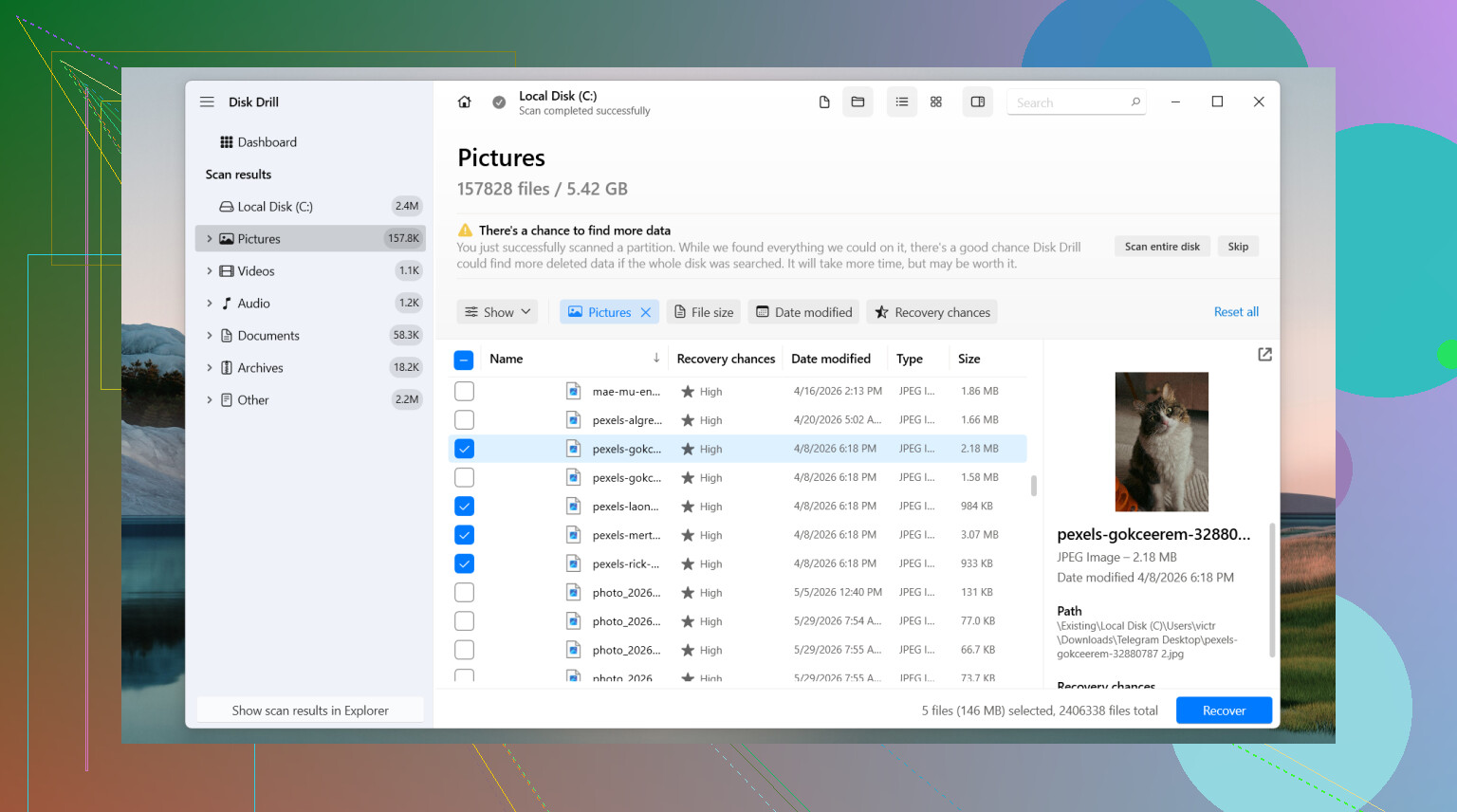
If I had to try software first, I’d start with Disk Drill. I’ve had decent luck with it on normal deletion cases. The thing I liked most was how often it kept filenames and folder paths intact when the file system info was still there. Preview helps too, since you don’t want to recover a pile of junk and hope one file is the right one.
How I’d do it
Install Disk Drill somewhere else if possible, not on the same drive where the file was deleted.
Pick the drive where the file used to live.
Run the scan.
Use search and filters instead of scrolling through the whole mess.
Preview the file if the option shows up.
Recover it to a different drive. Don’t put it back onto the source drive. Thats how people overwrite the thing they were trying to save.
On Windows, it allows unlimited scanning and previewing. Free recovery goes up to 100 MB. For a single document or a few photos, sometimes that’s enough.
Other tools people keep bringing up, for good reason
PhotoRec
This one gets recommended a lot because it’s free and it pulls a lot of data. I used it once on a messy card recovery job and, yeah, it found plenty. The catch is ugly. It leans hard on file signatures, so recovered files often come back with no useful names and no folder structure. If your recovery turns into ten thousand files named like recovered_004321, your evening is gone.
DiskGenius
I’d look at this when the issue seems bigger than one deleted file. Lost partition, damaged partition, RAW volume, file system weirdness, stuff like that. It tends to make more sense when the drive itself looks logically broken and the simpler tools don’t show much.
When I’d stop and call a pro
There’s a point where DIY stops being smart. If the drive clicks, drops out of Windows, throws hardware errors, or holds data you cannot afford to lose, I wouldn’t keep poking at it. A professional data recovery service makes more sense there. Software only helps if the drive stays readable. Physical failure is a different problem.
Short version
Use the drive as little as possible. Check backups first. If nothing turns up, try recovery software soon, not days later. The longer the drive stays active, the worse your odds get. If it’s an SSD, move fast. If the drive looks sick, stop.
3 Likes
Yes, people do recover permanently deleted files on Windows 11. I’ve seen it work, but the outcome depends on two things. Where the files were stored, and how much you used the PC after deletion.
I agree with @mikeappsreviewer on one big point. Stop using the drive. Especially if your files were on an SSD. On many Windows 11 systems, SSD plus TRIM cuts recovery odds fast. If it was a hard drive, your chances are often better.
One thing I’d add, check this before a full scan:
Windows Security, Protection history. Some files get quarantined, then people think they deleted them.
Office temp and autosave locations, if the lost stuff was Word or Excel.
OneDrive web recycle bin, not only the local folder.
Thumbnails and app caches for photos. You won’t get originals, but sometimes you save a lower-res copy.
If you want a beginner friendly Windows 11 deleted file recovery guide, this short video helps: easy Windows 11 deleted file recovery walkthrough
For software, Disk Drill is one of the better first tries because search, preview, and file type filters save time. I don’t fully agree with starting scans right away if the files were in synced folders. I’d verify cloud versions first, then scan. Less risk, less mess.
Also, don’t recover back to the same drive. People still do this and overwrite their own files. Kinda brutal, but yep.
If the docs are business, legal, or family archive stuff, a pro lab is safer than repeated DIY attmepts.

Yep, it’s possible, but “possible” and “likely” are two diff things.
I mostly agree with @mikeappsreviewer and @techchizkid, but I wouldn’t jump straight into a giant recovery session unless you first rule out whether the files were ever actually local-only. Windows 11 loves to blur the line with OneDrive sync, desktop backup, and app autosaves. I’ve seen people think a file was nuked, then find an older copy in OneDrive version history or inside the Recent section of the app that created it. Stupid, but it happens.
A couple things they didn’t really dig into:
- Search Windows with part of the filename plus the file extension, like
*.docxor*.jpg - Check
C:\Users\YourName\AppData\RoamingandLocalfor app-specific temp copies - In Word/Excel, open the app first, then look for Document Recovery or Manage Document
- If the photos were imported from a phone/camera, check that device again before assuming the PC copy was the only one
If you do need software, Disk Drill is a solid first shot on Windows 11 because it’s easier to sort through results than some of the more chaotc free tools. I don’t love relying on file carving tools first unless you enjoy digging through 8,000 unnamed JPGs from 2019.
One more thing people forget: if those files were on an SSD and the PC has been on for hours or days since deletion, odds can drop fast. Not always zero, just… not amazing.
Also, this thread has some useful extra discussion from people dealing with the same mess:
how to recover permanently deleted files on Windows without File History
If the files are truly irreplaceable, I’d stop DIY after one careful attempt. Repeated scans and installs can make a bad situation worse, realy fast.
One angle I’d add that @techchizkid, @andarilhonoturno, and @mikeappsreviewer only touched lightly is this: check whether the files were deleted from a secondary library location or a junction, not the folder you think. Windows 11 search indexing can lag, and some apps save into weird places like `Documents\Custom Office Templates`, `Pictures\Screenshots`, or even inside app-specific sandbox folders.
Also, I slightly disagree with the “scan ASAP no matter what” vibe. If the deleted files were from your system drive and that drive is an SSD, booting Windows normally over and over may already be doing damage. In that case, a better move is to connect the drive to another PC as a secondary drive, then scan it from there.
If you try software, Disk Drill is reasonable because the interface is easy to sort through.
Pros:
- good preview support
- decent filtering by file type
- easier for non-technical users
- often preserves original names when metadata still exists
Cons:
- free recovery limit is small
- deep scans can return a lot of clutter
- not the best choice if you want a fully free tool
- can be overkill for one tiny missing file
My take:
- HDD: fair chance if you stopped quickly
- SSD: maybe, but TRIM hurts
- synced folder: check cloud/version history before anything
- irreplaceable data: one careful DIY attempt max, then pro help
So yes, recovery happens. Just don’t keep “trying stuff” on the same drive. That’s usually what kills the last chance.