I accidentally formatted my hard drive, then formatted it again before realizing important files were still on it. Now I’m trying to recover photos, documents, and other data, but I’m not sure what the best recovery method is after a double format. I really need advice on hard drive recovery, what tools might work, and whether my files still have a chance of being restored.
I used to think a formatted drive was done for. Then I had to deal with a few of them, some after a rushed quick format, some after partition damage, some from plain user error. What I learned is simpler than people make it sound. Formatting does not always wipe your files out right away.
The first move matters more than anything else. Stop using the drive now. If it is an external disk, unplug it. If it is your main system drive, do not install apps, do not download files, do not copy stuff onto it. Every new write raises the odds of overwriting data you might still pull back.
One thing people mix up all the time, not every format does the same damage.
Quick Format
This usually clears the file system records, so your computer loses the map to the files. The drive looks empty, but the file data often still sits there until new data lands on top of it.Full Format
This is rougher. On newer Windows versions, a full format writes across the drive and checks sectors for errors. Once sectors get overwritten, software recovery is done. From what I have seen, quick format jobs give you a much better shot than full format ones.
1. Look for backups before doing anything fancy
I would check backups first, every time. A lot of people forget they had sync turned on months ago. Then their files are sitting in cloud storage the whole time.
Check these spots:
- OneDrive
- Google Drive
- iCloud
- Trash or Recently Deleted folders
- File History on Windows
This takes a few minutes. If you get lucky, you restore the files with names, folders, and timestamps still intact. Way cleaner than file carving after a format.
2. Try recovery software
If no backup turns up, I would move to recovery software next. For most formatted drives, this is the first tool worth trying.
I have had decent results with Disk Drill. It works on Windows and Mac, reads common file systems, and it has handled formatted volumes better than some of the other tools I tested. It also helps when partition info is damaged or missing, which happens more often than people think.
What I did:
- Install Disk Drill on a different drive. Not the formatted one.
- Run a scan on the formatted drive.
- Check previews for the files you care about.
- Recover them onto another disk or external drive.
The preview part matters. I learned this the hard way. A found filename means less than people think. If the preview opens, your odds are usually better.
3. Use a recovery lab if the files matter more than the bill
If software comes up empty and the data matters a lot, a recovery lab is the next step.
I would save this for the stuff you cannot replace, business records, legal files, family photos, old project archives, things like that. Labs have tools and hardware normal users do not. The price hurts, yeah, but I have seen cases where software found nothing and a lab still got data back.
If you formatted a drive by mistake, the short version is this. Stop writing to it. Figure out whether it was a quick format or full format. Check backups first. If no backup exists, use recovery software before doing anything else. Speed helps here, and so does not making it worse.
If both formats were quick formats, your odds are still decent. If the second one was a full format, your odds drop hard. That part matters more than the fact it happened twice.
I differ a bit from @mikeappsreviewer on one point. I would not spend much time guessing what Windows did. I’d check SMART first. If the drive has bad sectors or starts clicking, skip software and send it to a lab. Failing hardware ruins recoveries fast.
What I’d do:
1. Make a byte-for-byte image of the drive first.
Use ddrescue on Linux or R-Studio imaging tools. Work from the image, not the original disk. If recovery software crashes or you misclick, you still have the source intact. This is the step most people skip, then regret it.
2. Scan the image with two diff tools.
Disk Drill is fine for a first pass because it’s easy to sort photos, docs, and partitions. Then run PhotoRec or R-Studio after. Different tools find different stuff. I’ve seen one tool miss 30 to 40 percent of JPGs another found.
3. Sort by file type, not folder tree.
After formatting twice, file system metadata is often trashed. Filenames and folders might be gone. Focus on getting the content back first. Photos, PDFs, DOCX, XLSX. Worry about orgnizing later.
4. Recover to another drive only.
Not the same disk. Ever. Sounds obvous, but people still do it.
If this is SSD, check whether TRIM ran. If TRIM hit after the format, recovery gets ugly fast, sometimes near zero. HDDs usually give you a better shot.
If you want a quick explainer on Disk Drill before trying it, this video is decent:
see how Disk Drill handles formatted drive recovery
Short version. Image the drive first. Then scan the image with Disk Drill plus one deeper tool. If the drive is unhealthy or the files matter a lot, stop and send it in.
If it was formatted twice, the key detail is *what happened between those formats*. I kinda disagree with @mikeappsreviewer on one thing: “formatted twice” by itself is not the real killer. What kills recovery is any install, copy, update, or OS use that wrote fresh data afterward. Two quick formats with almost no writes after? Still recoverable pretty often on an HDD.
Also, don’t get tunnel vision on software right away like @kakeru suggests. Before scanning for hours, check whether the drive now shows the **correct capacity** in BIOS/Disk Management. If the size is wrong, super slow, or disconnects randomly, that points to hardware or firmware issues, and running repeated scans can make it worse.
A few practical things people miss:
- If this was an **external HDD**, try a different USB cable and port first.
- If it was reformatted from **NTFS to exFAT/FAT32**, file structure recovery gets messier, but raw file recovery may still work.
- If it’s an **SSD**, chances drop a lot because TRIM may have cleaned blocks already.
- If the files are mostly photos/videos, recovery odds are often better than for mixed project folders with lots of tiny files.
What I’d do is connect it read-only if possible, scan it with **Disk Drill** first because it’s easier to sift by file type and preview results, then decide if the results are worth pursuing further. Don’t recover back onto the same drive, obviously. Previewing actual files matters more than seeing a bunch of filenames that *look* promising.
Also, this may help if you want more tips for formatted disks and recovery software comparisons: best hard drive recovery software for formatted disks
If you can say HDD or SSD, and whether both formats were quick or full, people can give you a way less guessy answer.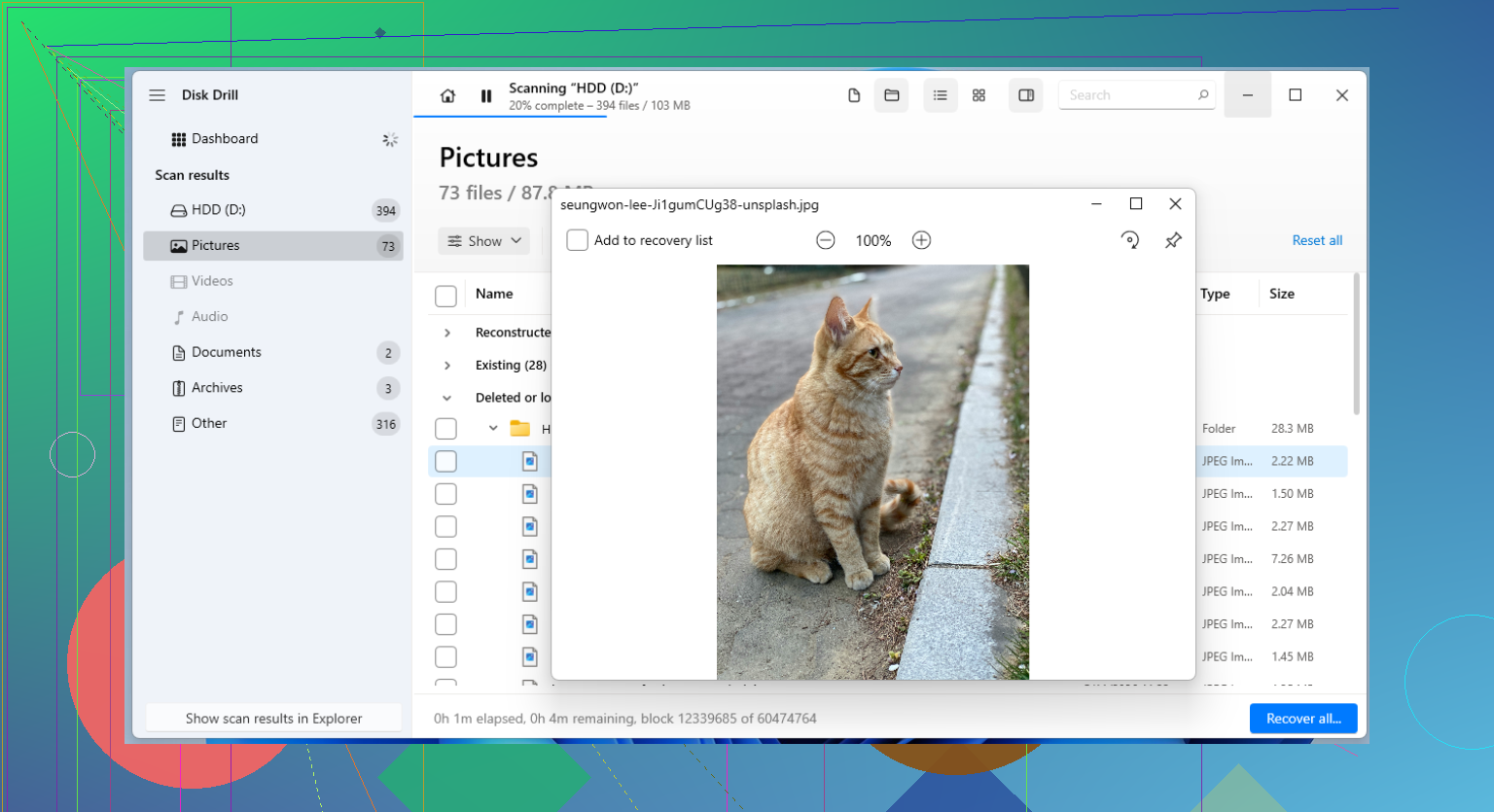
Small disagreement with @kakeru, @yozora, and @mikeappsreviewer: after a double format, I would care less about the “twice” part and more about whether the second format changed the partition layout or file system. If you went NTFS to exFAT, or recreated partitions, that can wreck file tree recovery even when raw file recovery still works.
My angle:
- Check partition start/end with a tool like TestDisk before doing broad recovery.
- If the old partition boundaries are restored, you sometimes recover way cleaner than with pure file carving.
- If the drive is encrypted, BitLocker/FileVault history matters a lot. Without that, scans may find junk only.
About Disk Drill:
- Pros: easy previews, good for photos/docs, friendly filtering, decent first-pass scanner.
- Cons: deep scans can return lots of orphaned files with generic names, less ideal when you need surgical partition repair logic.
So I’d use Disk Drill first for triage, then switch tools if results are messy. If your recovered files all come back renamed and folderless, that is normal after this kind of damage. Prioritize content over structure. If this was an SSD and it sat powered on after formatting, expectations need to be low.