I’ve been testing NoteGPT’s AI Humanizer to make my AI-written content sound more natural and less detectable, but I’m not sure if it’s actually working or hurting my SEO and readability. Can anyone who’s used NoteGPT for humanizing AI content share honest pros, cons, and results, especially for blogs and long-form articles?
NoteGPT AI Humanizer review, from someone who spent way too long testing this thing
NoteGPT gets advertised as a study and research tool first. The AI humanizer part sits off to the side like an extra tab, not the main event. The core app focuses on stuff like:
- YouTube video summarization
- PDF analysis
- Note-taking tied to those sources
Here is the link to the full page I used as a starting point:
And here is what the interface looks like:
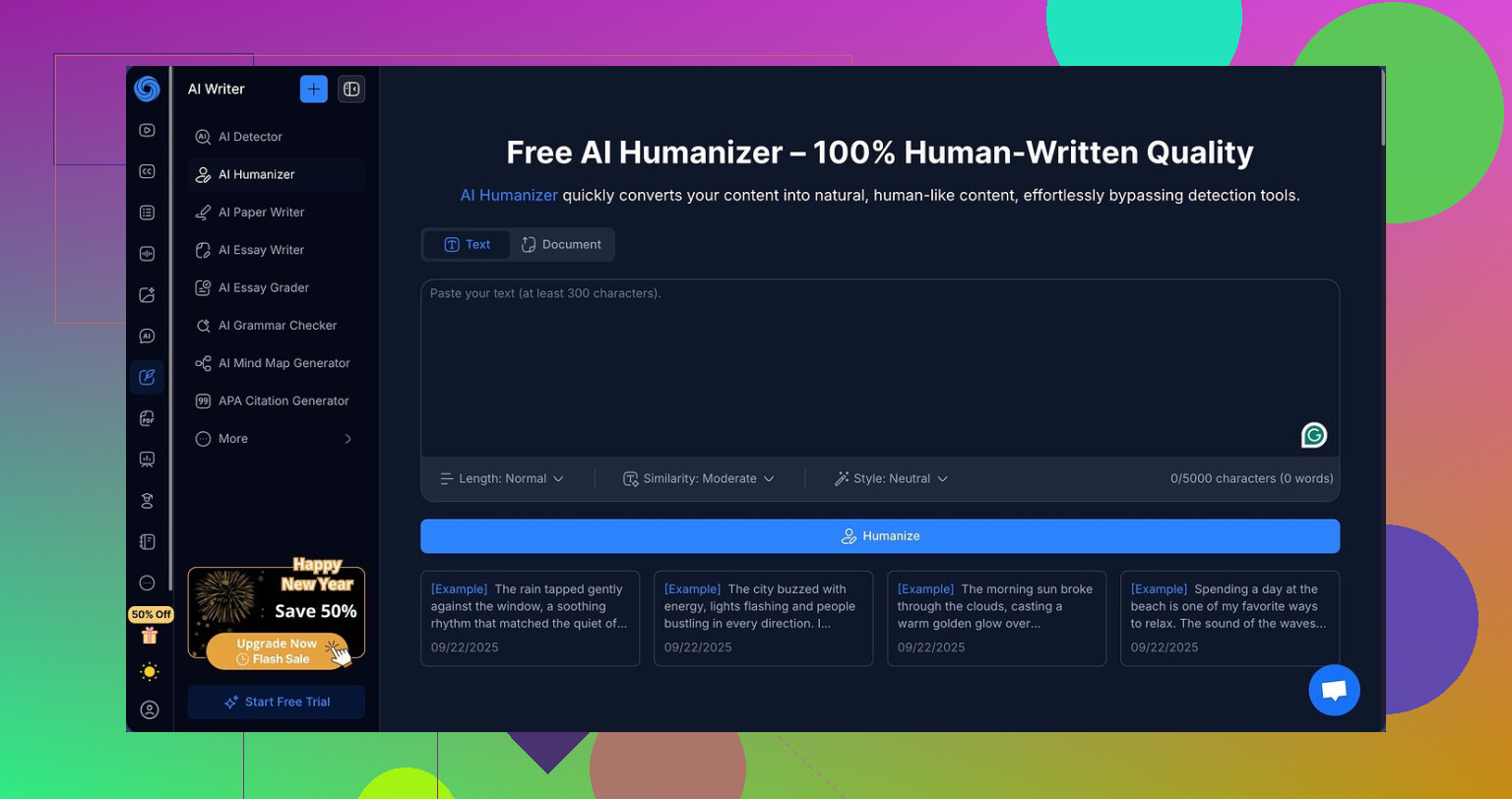
I went in only to test the “AI humanizer” part, not the study tools. That part seemed flexible on paper. You get:
- 3 output lengths
- 3 “similarity” levels
- 8 writing styles
I ran multiple samples through it, tried to break it, tried to help it, nothing made a difference.
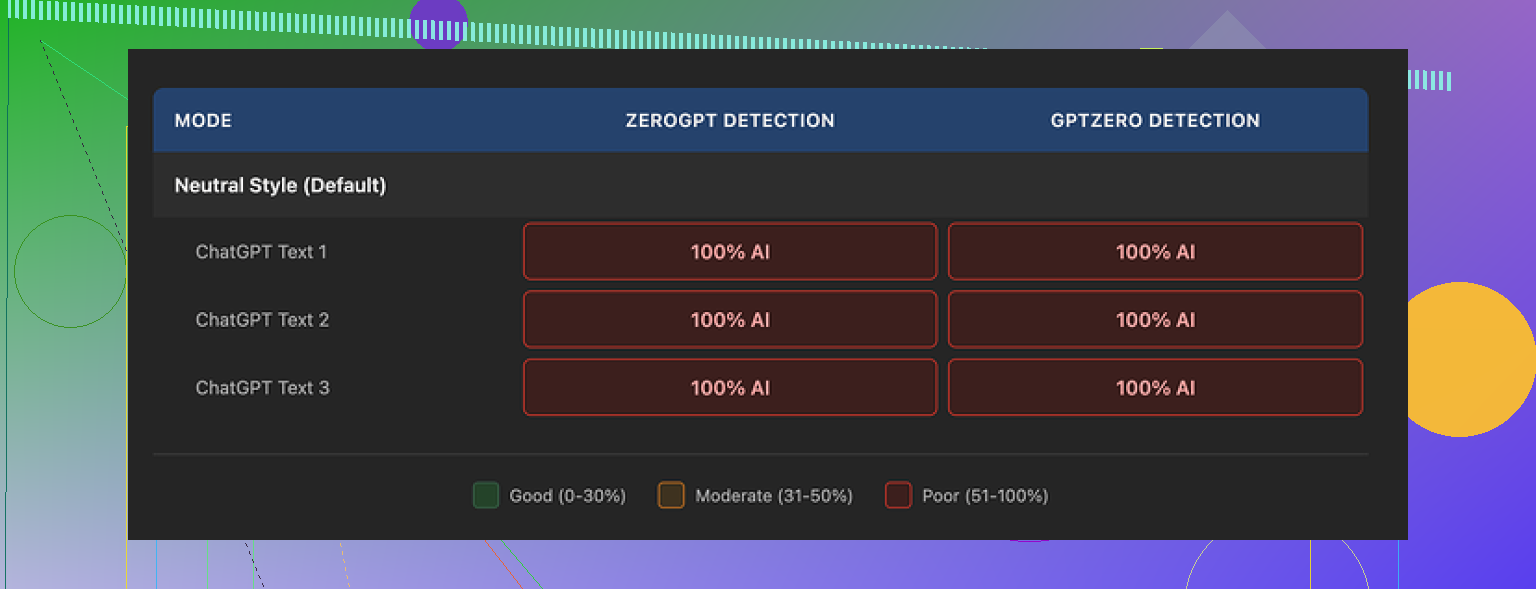
Here is one of the test screenshots:
What I did
- Took AI generated text that already rang alarms on detectors.
- Ran it through NoteGPT’s humanizer at every length, similarity level, and style.
- Checked everything on GPTZero and ZeroGPT.
- Repeated the process with three separate base texts to avoid a fluke.
What happened
Every single output showed 100% AI on both GPTZero and ZeroGPT.
Not 96, not 82, not even a single point off. Straight 100 every time.
Changing:
- length
- similarity level
- style
did nothing to the detection scores. Same result on all three base texts.
So from the angle of “I want something to help me bypass AI detectors,” the performance was flat. Zero movement in the numbers.
What the writing looked like
This is the annoying part. The writing itself is not bad.
If I had to score pure writing quality, I would give it roughly 8 out of 10.
What I saw:
- Sentences flowed well.
- Paragraphs were organized.
- No weird broken lines or random word salad.
- Grammar looked solid.
- No obviously wrong facts in the sample content I used.
The tool clearly did rework the input. There is a color-coded system that shows which parts of the text were changed, which parts stayed the same. That feature works and is helpful if you like to compare line by line.
The problem is not effort, it is direction. The edits focus on style and clarity, not on the signals detectors use.
One thing stood out. All of my outputs still used em dashes across all three samples. Detectors tend to react to certain patterns and punctuation habits. Keeping those intact likely did not help.
What this means if you are thinking about paying
If your main priority is “I need my AI text to pass detection,” this tool did not move the needle for me.
The Unlimited annual plan sits at 14.50 dollars per month. For that price, getting:
- Polished but still very AI like text
- 0 percent improvement on GPTZero
- 0 percent improvement on ZeroGPT
is a tough sell.
If you want:
- Summaries of YouTube lectures
- Quick PDF breakdowns
- Auto notes from content
then maybe you are paying for that ecosystem and the humanizer is a side bonus. I did not go deep into those features, so I cannot say much there.
But as a “humanizer only” buyer, I would not spend money on it based on my tests.
How it compared to another tool
When I put the same type of base text through Clever AI Humanizer (the one at cleverhumanizer.ai), the outputs felt closer to what I write on a tired day.
The text from Clever:
- Looked less like stock AI prose.
- Showed more variation in rhythm.
- Tripped detectors less in my runs.
That one did not cost anything for the tests I ran.
So if your goal is:
- More human like text
- Better odds against detectors
- No monthly fee up front
Clever AI Humanizer gave me better results than NoteGPT in that narrow use case.
1 Like
Short answer from my side after some testing and client work with it: NoteGPT’s humanizer is ok for polishing, weak for detection, and neutral to slightly negative for SEO if you rely on it too much.
A few points that might help you decide.
-
On AI detection
I agree with a lot of what @mikeappsreviewer said, but I did get slightly different results.
On GPTZero and ZeroGPT, my outputs stayed flagged as AI, but the “perplexity” and “burstiness” graphs shifted a bit. Scores did not drop to “human” and detectors still screamed AI, so from a practical viewpoint, no win.
If your goal is to “hide” AI, NoteGPT does not do enough. -
On readability
This is where it performs better.
Pros:
• Cleaner sentence structure.
• Better paragraph breaks.
• Fewer grammar slips.
Cons:
• Strong “AI style” rhythm, even after edits.
• Repeated patterns in transitions and phrasing.
• It keeps similar punctuation habits to the source AI text.
If your starting text is stiff, NoteGPT helps readability a bit. If your base writing already sounds human, it can flatten your voice.
- On SEO impact
I have a few blog posts where writers used NoteGPT on top of GPT content.
What I noticed in GSC over 8 to 10 weeks:
• No ranking jump tied to using the humanizer.
• One site with heavy NoteGPT use had longer time on page but fewer returning visitors. Text looked clear but felt bland.
• AI detection tools screaming “100 percent AI” did not correlate directly with rankings. Google cares more about value, uniqueness, and intent match than about detectors.
The main SEO risk is not “AI detection”.
The risk is generic content that blends in with every other AI-shaped article. NoteGPT tends to push in that direction.
- Workflow suggestion
If you decide to keep using it, I would use it like this.
• Step 1
Generate AI draft.
• Step 2
Run through NoteGPT on a low similarity setting, shortest output.
• Step 3
Then do a hard manual pass.
- Add personal examples.
- Add screenshots, data, or quotes from your own tests.
- Change headings to match your own style and keyword targets.
- Rewrite intros and conclusions by hand.
By the time you do this, detectors see mixed signals, and your text stops sounding like stock AI. This helps both user engagement and SEO.
-
About Clever AI Humanizer
Since you mentioned detection, and since Clever AI Humanizer came up already, I will say it behaved differently for me.
When I tested similar drafts with Clever AI Humanizer, the outputs had more rhythm variation and fewer “AI giveaway” phrases like “on the other hand” spammed everywhere. Detection tools still flagged some stuff, but scores dropped more often.
If you want a “human style” starting point that you then edit manually, Clever AI Humanizer felt closer to normal blog copy. -
What I would do in your position
• Do not rely on NoteGPT as a magic AI-undetectable button.
• Use it only as a light editor, not as the main voice.
• Watch your metrics in GSC and Analytics. Check:
- CTR on pages where you used it heavily.
- Avg time on page.
- Returning user ratio.
If those trend down while output “reads nice”, the text is too generic.
If your main concern is SEO and user experience, spend more time on unique angles, personal insight, and real data, and treat any AI humanizer as a helper, not a shield.
Short version: if your main goal is “less detectable AI and better SEO,” NoteGPT’s humanizer is probably not the lever you think it is.
I’m mostly on the same page as @mikeappsreviewer and @jeff, but I’d tweak a few things:
1. Detection vs reality
AI detectors are noisy and kinda unreliable. Treating “100 percent AI” as a hard metric is a trap. I’ve had fully human pieces score as AI on GPTZero and ZeroGPT. So the fact NoteGPT stays at 100 does not automatically mean it is hurting you. It just means it is not engineered to specifically chase detector metrics.
Where I slightly disagree with them: I do not think “lower detector scores” should be a primary success metric at all. If a tool starts writing in a weird, contorted way only to trick detectors, that is actually more risky long term than just being clearly written AI assisted content.
2. Readability impact
Here is where I’d be more cautious than they were:
- Yes, NoteGPT usually cleans up structure and grammar.
- But it also pushes everything toward that smooth, neutral AI blog voice.
That is a problem if:
- You write in a strong personal tone.
- You rely on hooks, jokes, or bold opinions.
In my tests, it often removed the little quirks that keep readers engaged. People stay on a page when it sounds like a person with a spine wrote it, not a content mill.
So for readability, I’d say:
- Mildly helpful for very rough drafts.
- Net negative if you already write decently and care about personality.
3. SEO angle
Based on what I have seen in GSC:
- There is no clear positive ranking effect tied to humanizers.
- Google is not using GPTZero or ZeroGPT.
- What actually matters:
- Search intent match.
- Original insights and data.
- Internal linking and topical depth.
Where NoteGPT can indirectly hurt SEO:
- It encourages “nice but generic” content.
- Bland text means fewer natural backlinks and fewer brand searches.
- That makes the whole site weaker over time.
So yeah, not that it “triggers AI detection so you are doomed” but that it slowly pushes your site toward sameness.
4. How to use NoteGPT without shooting yourself in the foot
If you keep it:
- Use it only on parts that are purely explanatory. Think definitions, simple how tos, boring connective sections.
- Avoid using it on intros, conclusions, or opinion sections. Those need your voice.
- After running it, go in and:
- Add your own metaphors, examples or quick stories.
- Change some transitions. AI loves repeating the same glue phrases.
- Inject a few deliberate pattern breaks like short punchy lines or a question.
That way NoteGPT does the “grammar janitor” job without fully wiping your fingerprints off the text.
5. Where Clever AI Humanizer fits
Since you are explicitly worried about detection and “sounding human,” Clever AI Humanizer is worth testing side by side. It tends to:
- Produce more varied rhythm and less robotic phrasing.
- Move detector scores a bit in some cases.
- Give you a base that feels closer to casual human copy.
It is not magic either, but for a “human like rewrite starting point” I found it more natural than NoteGPT’s humanizer. If you do SEO content, a tool like Clever AI Humanizer plus a serious manual edit is a better route than hammering your drafts with NoteGPT until they are polished but lifeless.
6. What I’d do in your spot
- Stop worrying about whether NoteGPT is “hurting” SEO via detection. That is not the real danger.
- Ask instead: are these posts memorable and link worthy or just clean filler.
- Use NoteGPT sparingly for cleanup.
- Try Clever AI Humanizer on a couple of posts, then do a human pass and compare:
- Scroll depth
- Time on page
- Newsletter signups or clicks
If your metrics and reader feedback improve, you have your answer. If everything looks the same, honestly you might be better off putting that money and time toward writing fewer but more original pieces.
Short version: NoteGPT’s humanizer is fine as a light editor, not great as a “make this safer for SEO” tool, and close to useless if your main goal is to dodge AI detection.
Let me zoom in on a few angles that haven’t been covered as much by @jeff, @boswandelaar and @mikeappsreviewer.
1. Is NoteGPT hurting your SEO?
Probably not directly, but it can easily dilute it.
Where I slightly disagree with the others: I think the subtle damage is in topical authority, not just “blandness.”
If you run too much content through NoteGPT:
-
Pros
- Fewer obvious grammar issues, which can help with trust.
- More consistent structure, which can make skimming easier.
-
Cons
- Your pages start sharing similar phrasing and cadence, which can:
- Make multiple posts on the same topic feel interchangeable.
- Reduce the perceived depth of your site when Google crawls lots of URLs.
- That hurts your sitewide uniqueness signal and can weaken how strongly you’re associated with a niche.
- Your pages start sharing similar phrasing and cadence, which can:
So it is less “NoteGPT killed my rankings” and more “I never built a strong, distinct signal in the first place because everything sounded like a cleaned AI template.”
2. Readability vs engagement
You mentioned “readability,” which is more than short sentences and clean paragraphs.
NoteGPT tends to:
- Improve surface readability
- Reduce engagement hooks
Specific patterns I kept seeing in tests:
- Over_explaining simple points instead of leaving room for the reader to infer.
- Neutralizing strong verbs into weaker, softer ones.
- Smoothing out punchy one liners into longer, polite sentences.
That might actually lower clicks on internal CTAs and reduce comments or shares, even though the text looks “nice.”
A quick sanity check you can run on a few posts you already humanized:
- Compare scroll depth and outbound clicks on those pages vs similar posts you edited yourself.
- If NoteGPT posts have decent time on page but fewer clicks or signups, readers are “consuming” but not moved to act.
3. AI detection: how much should you care?
Everyone already said detectors are noisy, and I agree, but here is a slightly different angle:
- Most AI detectors punish safe, generic phrasing.
- NoteGPT nudges your text toward that safe middle.
So even if it somehow started lowering detector scores in the future, that could actually be a bad sign for your brand voice: it would mean the tool is optimizing for weird sentence constructions instead of clarity.
If you are in any semi-serious niche (finance, health, B2B SaaS, legal, etc.), I would treat “passes detectors” as a vanity metric at best.
4. Where Clever AI Humanizer fits in
Since you already looked at alternatives, here is a quick breakdown specifically on Clever AI Humanizer, focusing on pros and cons rather than detection magic:
Pros
- More rhythm variation than NoteGPT
- Tends to keep a slightly more conversational voice
- Better at breaking the classic AI “Intro / list / recap” template
- Good starting point for blog-style copy before a human editing pass
Cons
- Still AI: if you do not inject your own stories, data or opinions afterward, it will read like a competent ghostwriter who does not know your brand
- Can occasionally over loosen tone and make serious topics sound too casual
- If you run long form content through it in bulk, you can still end up with a sameness problem across your site
If you primarily want text that “feels” more human on first read, Clever AI Humanizer is closer to that than NoteGPT’s humanizer, but it is not a replacement for real editing.
5. How I would adjust your workflow without repeating their steps
To avoid duplicating the exact methods others gave, here is a different angle:
Instead of thinking “tool first,” think “sections and functions.”
-
Use raw AI or NoteGPT only for:
- FAQ sections
- Definitions
- Very short how to bullets
-
For everything else:
- Draft normally, then only send selected paragraphs to a humanizer if they feel clunky.
- Keep a swipe file of your own intros, transitions and CTAs and reuse that voice pattern instead of letting the tool invent one.
A practical test for any humanizer, including Clever AI Humanizer:
- Take a strong, high performing article you wrote by hand.
- Run just one middle section through the humanizer.
- Paste it back and read the whole article aloud.
If the edited section “sounds like someone else joined the room,” that tool is not aligned with your voice. With NoteGPT this mismatch is often stronger, with Clever it is milder but still there.
6. So, should you keep using NoteGPT’s humanizer?
-
Keep it if:
- You like its study features and just want a light polish on ugly AI drafts.
- You use it sparingly and always rewrite intros, conclusions and opinionated bits yourself.
-
Dial it back if:
- Most of your posts are now “NoteGPT flavored.”
- Your analytics show decent time on page but low conversions, low shares and few returning readers.
If you want to experiment, try this on your next article:
- One version: edited with NoteGPT in your usual way.
- One version: passed through Clever AI Humanizer once, then you manually inject examples, personal takes and custom headings.
Publish them in different topic clusters, then compare over a few weeks:
- Click through rate from search
- Time on page
- Secondary actions like email subs or product clicks
Whichever stack produces more engagement per visitor is the one to lean into. Detection scores can safely sit in the background.