My CompactFlash card was working fine, but after moving photos to my computer, several files suddenly disappeared and now the card looks empty or incomplete. These are important images I need to recover, and I’m afraid using the card again could overwrite them. I need help with safe CF card data recovery steps and any reliable software or methods that might restore the missing files.
CF card shows up empty, here’s what I’d do first
Yeah, I’ve seen this happen, and it feels awful the first time. A CF card looks blank, or your camera says it wants to format it, and you start thinking the whole shoot is gone. Sometimes it is bad news. Sometimes it’s only the file table getting messed up, while the photo and video data is still sitting on the card.
First thing, stop touching the card.
Do not put it back in the camera. Do not shoot more photos. Do not copy files onto it. Do not accept any format message. If the card’s index got damaged, your files might still be there. The part you need to avoid is overwriting them.
What I’d try before anything else
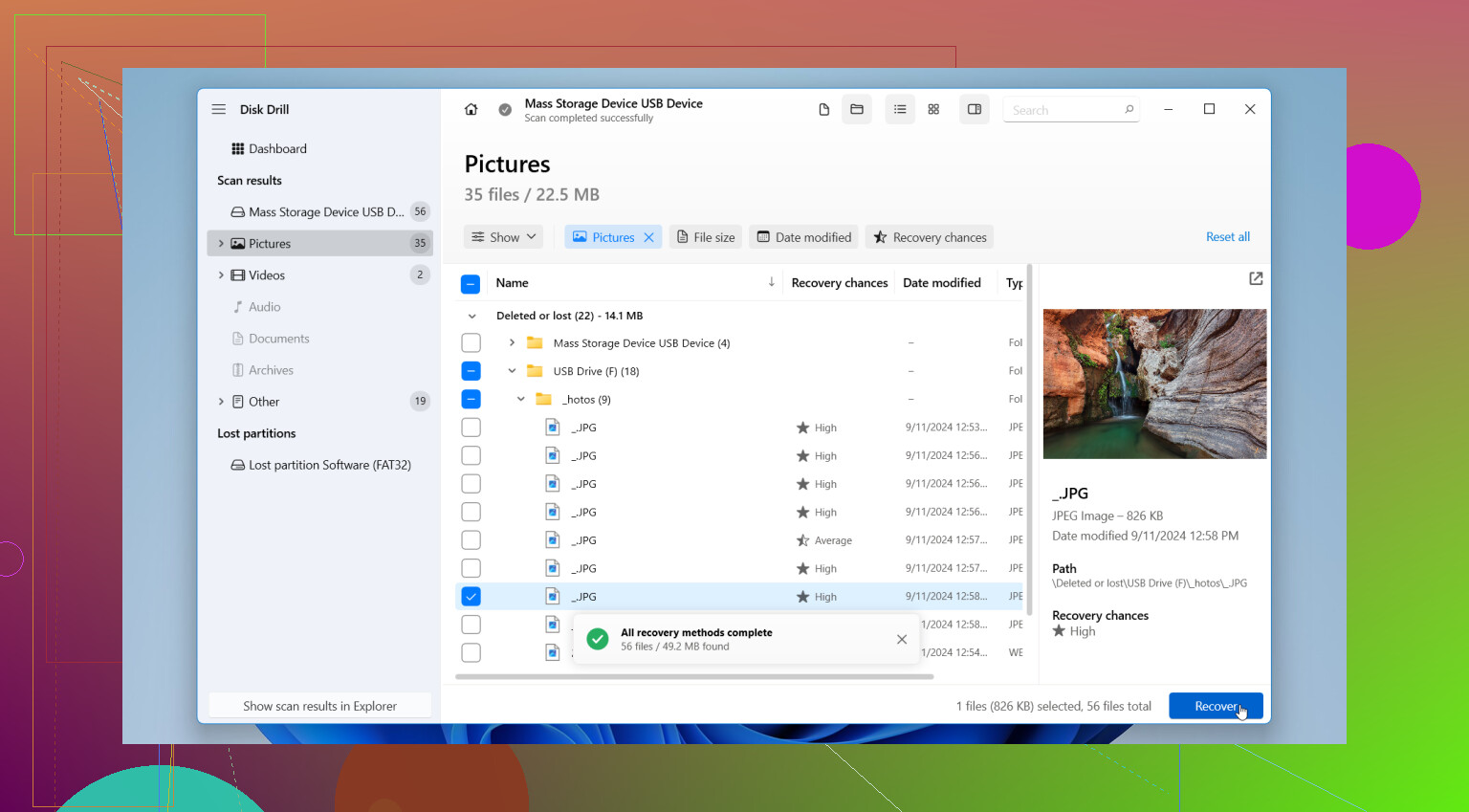
If you don’t already have a backup, I’d go straight to recovery software. I’ve had decent luck starting with Disk Drill. It’s easy enough to use without spending an hour reading menus, and it reads common CF card formats like FAT32 and exFAT. It also handles a lot of camera file types people care about, JPG, CR2, CR3, NEF, ARW, MOV, MP4.
The preview part matters more than people think. If the app shows a clean preview, your odds are usually better than if the file name appears with no usable preview.
The order matters
-
Remove the CF card from the camera
Leave it alone until recovery is finished. -
Use a dedicated CF card reader
I would skip connecting the camera by USB. A separate reader tends to give recovery tools cleaner access to the card. -
Install the recovery app on your computer
Not on the CF card. Sounds obvious, but I’ve seen people make this worse in a panic. -
Scan the card
Open Disk Drill, pick the CF card, then run a full scan. Let it finish if the card stays connected and readable. -
Preview what it finds
Check the photos and videos before restoring anything. If previews open, that’s a good sign. -
Recover files to a different drive
Save them to your internal drive, an external SSD, or some other storage. Never write recovered files back to the same CF card.
If the card acts weird, slow down
This part gets skipped a lot. If the card reads slowly, drops connection, throws read errors, or starts acting flaky, I’d make a byte-for-byte image first and scan the image instead of hammering the original card over and over. Fewer reads, less stress on the card, safer workflow.
Also, I would not run CHKDSK, macOS First Aid, or any repair tool before recovery. Those tools write changes to the file system. You want your data out first. Repair later. Format later. Not now.
When software is not the right move
If the card is not detected anywhere, has bent or damaged pins, gets hot, keeps disconnecting every few seconds, or contains stuff you cannot afford to lose, I’d stop and look at a recovery service instead.
For a card your computer still detects normally, software is usually the first thing I’d try. For a card with physical issues, I wouldn’t keep poking at it. That’s where people lose the last good read they had.
Hope this helps a bit.
3 Likes
If the files vanished right after transfer, I’d check the computer first before doing a long recovery run. I don’t fully agree with @mikeappsreviewer on going straight into a full scan every time. Sometimes the photos got moved into a different folder, imported into Photos/Lightroom, or hidden by a bad copy job.
Do this first.
Check your PC import folders, temp folders, and trash. Search by file type, .JPG, .CR2, .NEF, .MOV. Sort by date taken, not date modified. On Windows, enable hidden files. On Mac, check Photos imports and the Recently Deleted album. I’ve seen people think the CF card ate the pics, then find them on the desktop in some dumb folder. Been there, typo-level dumb.
If the card still shows empty in more than one reader or computer, then use Disk Drill. It’s one of the better CF card recovery tools for photo and video work. Scan for existing and lost data, then recover to your hard drive, not the card.
If you want the best SD card recovery software for photos and videos, look for strong RAW support, preview, and deep scan. Disk Drill fits tht pretty well.
One more thing. Compare card capacity to used space. If a 32GB card still shows 28GB used but no files visible, your data often still exists and the directory is damaged. If it shows near 0 used, recovery gets harder, but not impossible.
Also worth a quick read, see how photo recovery tools handle missing camera files.
If the files vanished after transfer, I’d also verify whether the problem is actually the CF card’s directory or your computer’s copy process. Small distinction, big diff.
@sternenwanderer is right about checking where the files may have landed on the computer first, and @mikeappsreviewer is right about not writing anything back to the card. Where I slightly disagree is this: before doing repeated scans on the original card, make an image of it if the card is even a little unstable. That gives you one clean source to work from instead of poking the card to death.
A few extra things to check that haven’t been stressed enough:
- Try a different card reader, not just a different USB port
- On Windows, look in Disk Management to see if the full partition is still there but unmounted
- On Mac, check Disk Utility just for visibility, not repair
- If your camera still reads thumbnails but the computer does not, that points more toward file system weirdness than total loss
- If the used space is still there, that’s a very good sign
I would not trust the card again even if recovery works. CF cards can fail quietly, and sometimes the first symptom is “folders gone, surprise.” Recover first, then retire it or at least test it thoroughly.
If the card is readable, Disk Drill is a solid place to start for CompactFlash photo recovery because it handles RAW formats well and lets you preview recoverable files before saving them elsewhere. Save everything to another drive, obvously.
Also, this may help if you’re comparing similar camera card recovery cases: real-world CFexpress image recovery help thread.
If the card disconnects, gets hot, or starts making the reader act weird, stop messing with it and go pro service. That’s the line where DIY turns into “well, that was a bad idea.”