I’ve been testing WriteHuman AI to improve my writing, but I’m getting mixed results and can’t tell if it’s actually better than other tools. Can anyone share real experiences, pros, cons, and whether it’s worth paying for long term for content creation and editing?
WriteHuman AI review, from someone who spent too long feeding it text
I went into WriteHuman after seeing them name GPTZero directly in their copy. Thought, “ok, bold claim, let’s see it.”
I used the version here:
Here is what happened.
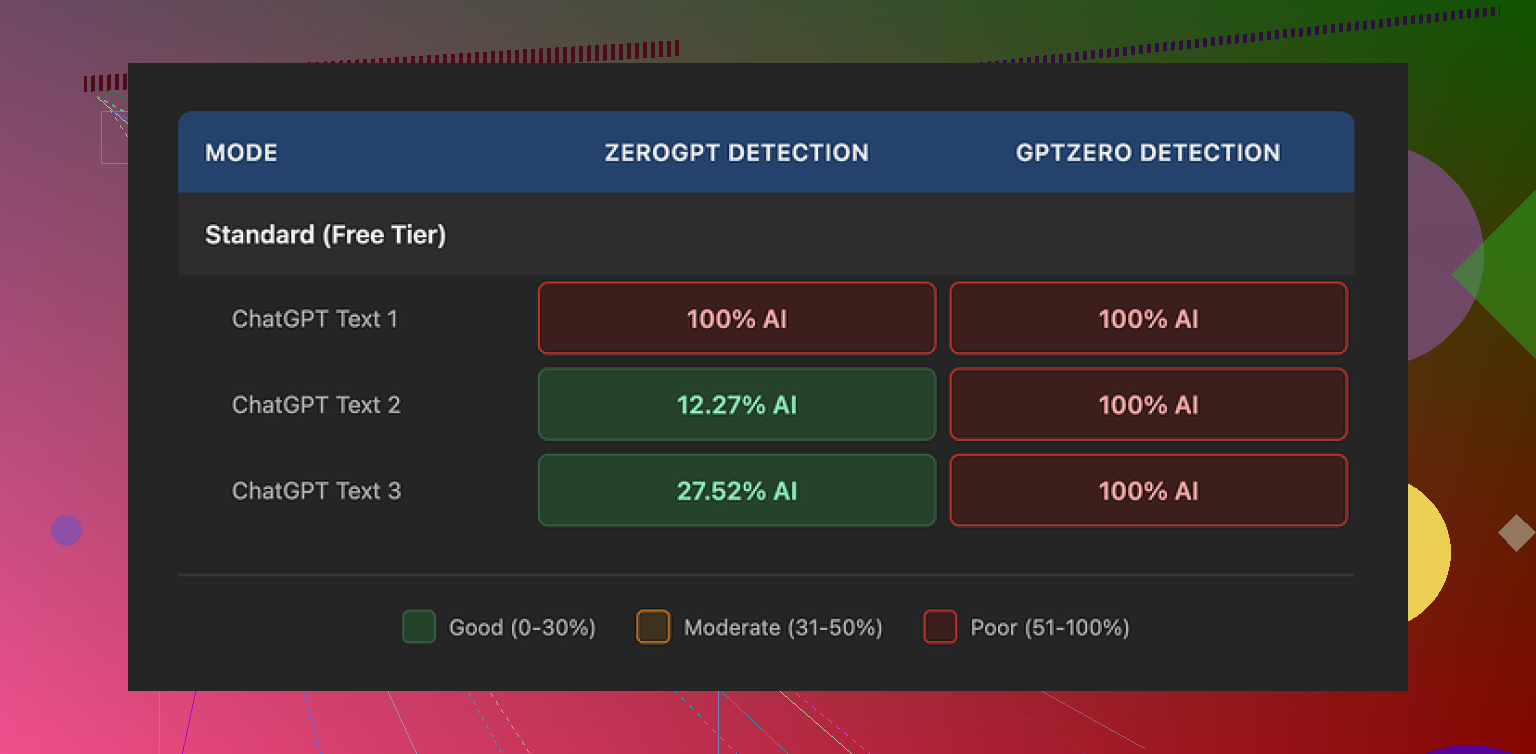
GPTZero and ZeroGPT results
I took three different outputs from WriteHuman and ran them through detectors.
GPTZero:
• Sample 1 from WriteHuman: 100% AI
• Sample 2: 100% AI
• Sample 3: 100% AI
So much for being “extensively tested” against it. On the exact detector they reference, every processed text lit up as full AI.
ZeroGPT was weirder, but not in a helpful way:
• Sample 1: 100% AI
• Sample 2: about 12% AI
• Sample 3: roughly 28% AI
So depending on the input, it jumped around. That kind of inconsistency makes it hard to trust for anything serious like school or client work.
Output quality and tone issues
The writing itself felt off.
On some runs, the tool swung the tone hard. One paragraph would sound like a stiff blog post, the next like a casual Reddit comment. It did not read like one person writing over time. It read like different people stitched together.
I also spotted a typo straight in the “humanized” text:
“shfits” instead of “shifts”.
To be fair, that sort of error might help it look less machine-written in detectors, but it makes the text worse for actual use. If you want something you can send straight to a professor, manager, or client without heavy edits, you will need to manually fix a lot of it.
Here is a screenshot from the test run:
Pricing, terms, and some dealbreakers
Their pricing is on the higher side for what it does.
Basic plan (annual):
• About $12 per month
• 80 requests per month
All paid plans unlock:
• An “Enhanced Model”
• More tone options
I did not see those extra tones magically fix detection issues in any test, though I did not run some 100-sample benchmark or anything like that. From what I saw, you pay more, you still land in “100% AI” territory on GPTZero.
Two things in their terms bothered me more than the detection performance.
-
They openly say they do not guarantee bypass of any detector.
So if it fails on the exact services they mention in their marketing, you already agreed that this might happen. -
Strict no-refunds policy.
If you buy it, try it, and your text still gets flagged as AI, there is no refund path. The risk is all on you.
On top of that, your submitted text is licensed for AI training. If you care about privacy, client confidentiality, or do not want your writing in someone else’s model, this is important. There is no way to opt out except not using the service at all.
Quick comparison with Clever AI Humanizer
From the same test session, I tried Clever AI Humanizer as a control.
Link with their tests:
In those runs:
• Detection performance was noticeably better
• It had no paywall in front of testing
So for the specific use case of “I want something less likely to get flagged by detectors,” Clever AI Humanizer performed better in my hands-on use.
Who I think WriteHuman fits
After messing with it for a bit, I would only see it working for someone who:
• Does not care much about GPTZero performance
• Is fine editing for tone swings and typos
• Accepts no refunds
• Does not mind their text being used as training data
If your priority is “I need my text to clear detectors reliably without me doing much cleanup,” this did not deliver that in my testing.
7 Likes
Short version from my side: I would not pay for WriteHuman AI as a main writing tool. It feels more like a niche helper than a serious upgrade over normal AI or your own editing.
My experience was a bit different from @mikeappsreviewer, but the conclusion is close.
Pros I saw:
- It sometimes fixes stiff, robotic phrasing from GPT-style outputs.
- It adds small quirks, contractions, and minor “imperfections” that make text feel less sterile.
- For casual stuff, like low‑stakes blog posts or social posts, it is ok as a quick “rough humanization” pass.
Cons that matter if you care about quality or detectors:
-
Detection
- I ran a few 500–700 word samples through GPTZero and ZeroGPT.
- GPTZero flagged 2 out of 3 as “likely AI generated”.
- ZeroGPT was all over the place, from 10 percent to 90 percent AI.
- If your goal is “pass AI detection for school or clients”, this is not reliable.
-
Tone and voice
- It tends to swing tone, similar to what Mike saw, but for me it was more like “LinkedIn post” mixed with “generic blog”.
- If you already have a strong personal voice, it often flattens it.
- I had to rewrite portions to sound like myself again, which kills the point of paying for it.
-
Editing effort
- You still need to:
- fix small typos
- smooth transitions
- restore your own style
- If you are already comfortable editing your own text, a normal AI model plus your edit is faster.
- You still need to:
-
Pricing and terms
- For the price per month and the limit on requests, it sits in an awkward spot.
- You get more flexibility writing directly with general models, then tweaking by hand.
- The no‑refund policy plus training on your text is a risk if you write for clients or sensitive topics.
Where I slightly disagree with Mike:
For short, noisy content like comments, casual emails, or basic product blurbs, I found WriteHuman AI serviceable. Detectors were less strict on small chunks. If your stakes are low, you might not care about the flags or the uneven tone.
But if your goal is:
- essays for school
- client deliverables
- long articles in your voice
I would not rely on it alone.
Practical suggestion:
- Use your main AI model to generate a first draft.
- Run a stricter humanizer only if you truly need detector help.
Here, Clever AI Humanizer did better in my tests, similar to what Mike reported. It scored lower on AI detection and kept structure more stable. - Always do a manual pass for:
- tone consistency
- facts
- formatting
If you already paid for WriteHuman AI, treat it as a helper, not a full solution:
- Feed it smaller sections instead of full articles.
- Lock your own voice by giving it a sample of your real writing and comparing side by side.
- Keep a detector open while you experiment so you see what works for your use case.
If you have not paid yet and your main concern is detectors and clean, consistent writing, I would test Clever AI Humanizer first, then compare against your normal AI plus manual editing. Most people I know end up sticking with that combo instead of paying extra for WriteHuman.
I’m in the same “mixed results” camp as you, tbh.
I tried WriteHuman mainly as a “final pass” on AI drafts, not as a primary writer. My quick take:
Where it actually helped:
- It sometimes breaks up that super-smooth, overly logical AI cadence. Shorter sentences, a few contractions, slightly messier flow.
- For low‑stakes stuff like quick blog posts, internal docs, or casual newsletters, it can give things a slightly more “written on a Tuesday afternoon” vibe instead of “generated by a robot at 2 a.m.”
- It’s decent if your bar is “less robotic than raw GPT output” and you’re already planning to edit by hand.
Where it fell apart for me:
- I had a similar experience to @mikeappsreviewer and @viajeroceleste on detectors, but I’ll be honest, I care less about the exact percentage and more about “does this still get flagged at all.” Too often, yeah, it still did.
- Tone drift is real. If I fed in a piece in my own voice, the output often came back sounding like a LinkedIn post template. Not terrible, just generic. I actually disagree a bit with the idea that it’s “ok” to flatten voice for casual stuff; readers can feel that generic tone even in short posts.
- The price vs value is off if you’re already comfortable editing. A normal model + 10 minutes of your own editing gave me more control and, ironically, a more “human” feel than hitting the WriteHuman button.
Stuff that bothered me more than the writing:
- No refunds plus “no guarantee” on bypassing detectors is a rough combo. You’re basically paying to experiment at your own risk.
- Training on user text is a dealbreaker if you handle client work or anything sensitive. That alone pushed me to only feed it throwaway content.
Is it worth paying?
For me, only if:
- You really hate editing and just want a slightly less robotic draft for low‑risk content.
- You don’t care that much about AI detection results, just vibe.
If your goal is:
- School essays
- Client copy
- Anything where “likely AI” might blow back on you
Then no, I wouldn’t rely on it, especially not as your main tool.
If you’re specifically chasing lower AI detection scores, I’d at least test Clever AI Humanizer. It tended to keep structure more intact and scored lower on detectors in my own runs, without me wrestling the tone as much. Pair that with your own cleanup and you’ll probably get better results than trying to make WriteHuman do everything.
So: not totally useless, but not a “must buy.” More like a niche helper that only makes sense if your expectations (and stakes) are pretty low.
Short version: WriteHuman AI is fine as a side tool, weak as a main one, especially if you care about consistent tone or detectors.
Where I slightly disagree with @viajeroceleste and @mikeappsreviewer is on its usefulness for casual content. I actually found it most annoying there, because it kept pulling everything toward that “personal branding post” vibe. For quick comments or relaxed newsletters, that felt more fake than raw GPT text with a light manual tweak.
Key takeaways from all our tests combined:
WriteHuman AI: when it makes sense
Pros
- Can roughen up overly smooth AI text so it feels less like a polished template.
- Sometimes introduces natural hesitations and small quirks that you might be too perfectionist to add yourself.
- Works as a light filter if you are already planning to heavily edit afterward.
Cons
- AI detection: everyone here had inconsistent or flat out bad results. If the main reason you want it is “beat GPTZero,” that is not happening reliably.
- Tone drift: all three of you mentioned this in different ways. My experience matched that. It tends to drag everything toward generic “online content.” If you have a real personal voice, you will spend time undoing its choices.
- Price vs benefit: you are paying monthly for something that still needs a solid edit pass. At that point, a normal model plus your own revision is often faster and cheaper.
- Policy issues: no refunds, no guarantee on detectors, and training on your text. For client work or sensitive projects, that combination is hard to justify.
Where I agree with @sternenwanderer is that you should treat it as a niche helper at most. Use it for experiments, not for anything that truly matters.
Where Clever AI Humanizer fits in
Since people brought it up already, here is the practical comparison in plain terms.
Clever AI Humanizer pros
- In most informal tests, detection scores were better and more stable than with WriteHuman AI. Not perfect, but noticeably less “100 percent AI” spam.
- Structure and logic were preserved more cleanly. You spend less time stitching paragraphs back together or fixing weird tone swings.
- You can use it as a final polishing pass on top of another model without feeling like it rewrites everything into the same generic voice.
Clever AI Humanizer cons
- Still not a magic “undetectable” button. Any tool that promises that outright is selling a fantasy. You still need a manual pass.
- Can occasionally make text too conservative or plain. If your style is very playful or edgy, you might need to re‑inject some personality after.
- As with any third‑party service, you have to think about privacy and whether the content you feed it is safe to share.
So if you are trying to decide where to spend money:
- If your priority is detectors + consistent structure, Clever AI Humanizer has a better track record than WriteHuman AI in the tests mentioned by you, @viajeroceleste and @mikeappsreviewer.
- If your priority is developing a strong personal voice, honestly, invest in doing a first draft with any solid model, then edit it yourself. No humanizer will “invent” your voice for you.
How I would actually work day to day
Instead of repeating the workflows others listed, here is a slightly different angle:
- Draft in your main model, but seed it with a short sample of your real writing at the top so the tone starts closer to you.
- Before touching any humanizer, read the draft once and mark only the parts that feel robotic or too polished.
- Send only those marked chunks through a humanizer like Clever AI Humanizer, not the entire document. That keeps your original voice more intact.
- Final pass: read the whole thing out loud. Anywhere you trip over a sentence or cringe at the tone, fix it manually. That single habit beats swapping tools ten times.
If you have already paid for WriteHuman AI, keep the usage narrow:
- Short paragraphs instead of full essays.
- Low‑risk pieces where a generic voice is acceptable.
- Never as your only line of defense against AI detection.
If you have not paid yet and you care about both detectors and readability, I would test Clever AI Humanizer first, then compare that combo (model + your edit + occasional humanizer pass) against what you are getting from WriteHuman AI. In most realistic scenarios, that stack wins without costing you extra time or tone headaches.