I’ve been testing Writesonic’s AI Humanizer to make my AI-written content sound more natural, but I’m not sure if it’s actually helping with authenticity, SEO, or avoiding AI detectors. Some outputs feel better, others still seem robotic. Can anyone share real experiences, pros and cons, and whether it’s worth using for blog posts and website copy?
Writesonic AI Humanizer review from someone who paid for it
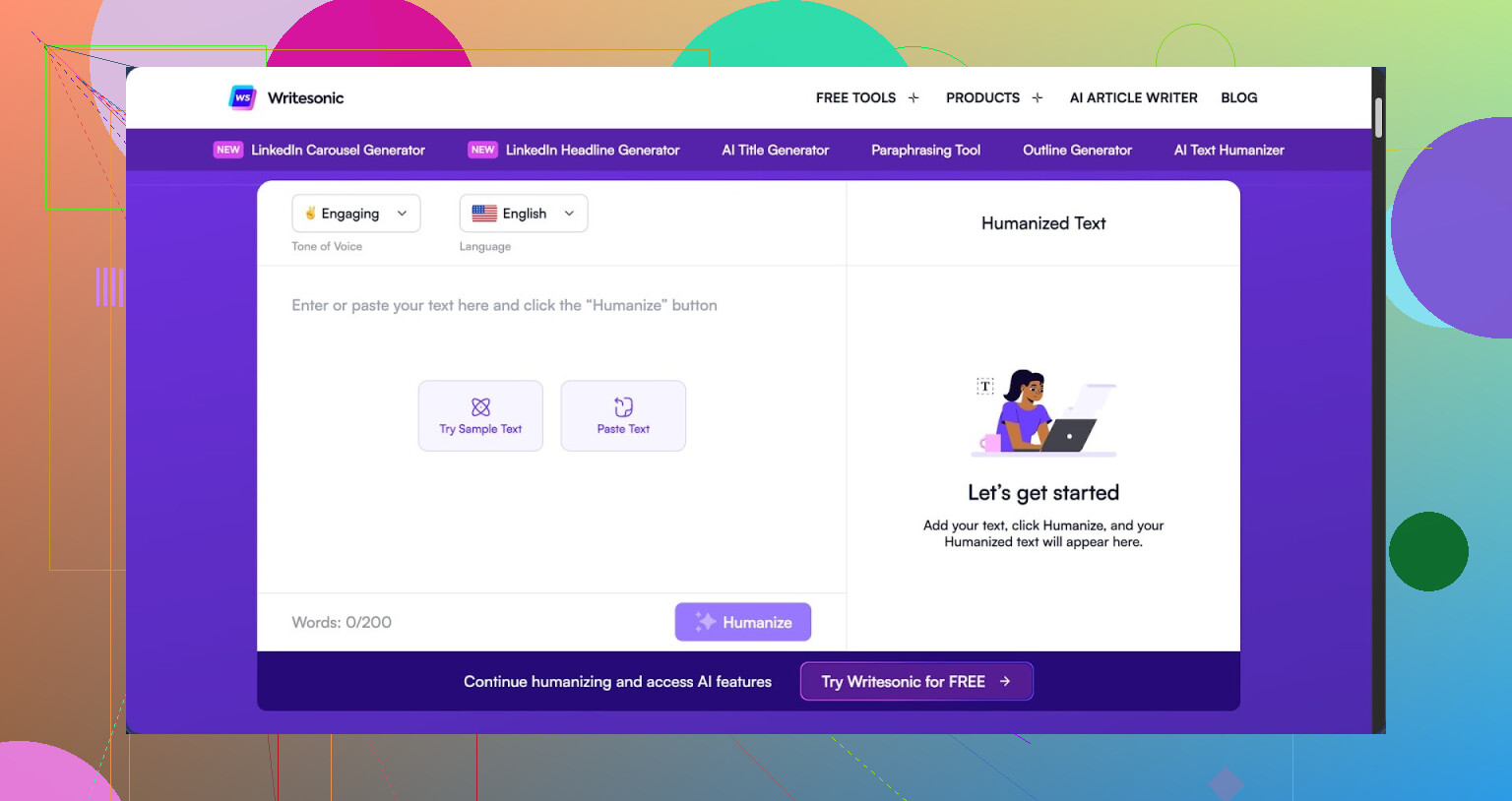
I tried the Writesonic humanizer so you do not have to. Short version, it costs more than everything else I tested and still got flagged all over the place.
If you want the original reference I used, it is here
Price and what you really pay for
The humanizer sits inside the broader Writesonic platform. To get unlimited access to it, I had to jump to a plan that starts at 39 dollars per month. That is not 39 for a dedicated undetectable tool, that is 39 for their whole SEO and content system, where the humanizer is more like a side button.
Out of all the tools I went through, this one landed at the top of the price range while staying near the bottom for detection performance.
How it did on AI detectors
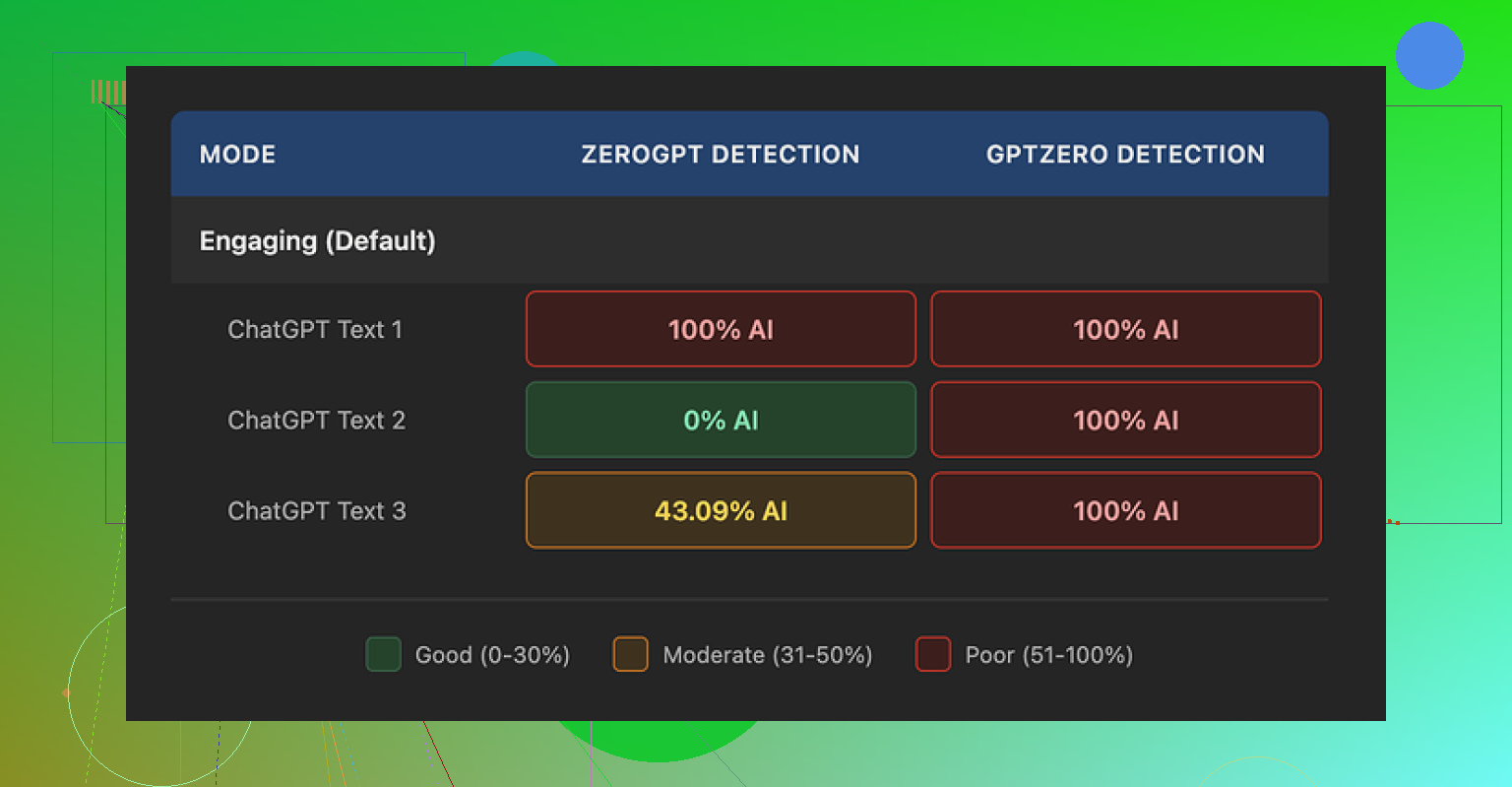
I ran three different humanized samples through two detectors.
What I saw:
GPTZero
All three samples came back as 100 percent AI generated. No borderline scores, no mixed sections, full red across the board.
ZeroGPT
This one was all over the place. The same style of humanized output gave me three different scores:
• Sample 1, 100 percent AI
• Sample 2, 0 percent AI
• Sample 3, 43 percent AI
So if you look at it coldly, one detector called everything fake, the other could not make up its mind. For a tool positioned as a humanizer, that is not encouraging.
Here is one of their own screenshots from my run:
How the text reads
Quality wise, I ended up giving it about 5.5 out of 10.
Here is why.
The humanizer seems to follow one simple rule. Shorten the sentence, swap any slightly technical word with something you would use talking to a 9 year old.
Concrete swaps I saw in my tests:
• “droughts” turned into “long dry spells”
• “carbon capture” became “grabbing carbon from the air”
• “rising sea levels” became “sea levels go up”
One or two of those in a kids’ explainer is fine. In an article about climate science or policy, it feels wrong. You lose nuance. You lose domain tone. It starts sounding like a school worksheet.
On top of that, I kept spotting punctuation issues in all three samples. Commas missing, weird pauses, awkward breaks. It looked like the system pushed hard on sentence splitting, then did not clean up what it broke.
Strike two for me, em dashes stayed in place. Detectors often latch on to those. A humanizer that does not even normalize basic punctuation choices feels half finished.
Free tier details
If you want to poke at it without paying:
• You get 3 runs
• Each run is limited to 200 words
• After that you need to create an account
• The site notes that content you feed in on the free tier can be used to train their models
So if you are dealing with sensitive client copy or internal docs, I would keep them away from the free version.
What I use instead
In the same round of tests, I tried Clever AI Humanizer as a comparison point.
My notes from that run:
• Output sounded closer to how people write in email and reports
• Detection scores landed lower across tools
• No subscription wall, it was free to use when I tested it
Link for reference, same as above:
Who this is for and who should skip it
If you already pay for Writesonic for SEO stuff and you sometimes need to simplify copy for a general audience, then the built in humanizer is a small bonus. It does shorten and simplify text.
If your main goal is to reduce AI detection risk for school, clients, or compliance checks, my experience with this tool was not good enough for the cost. I would not upgrade a plan only for this feature.
1 Like
I had a similar experience to you testing the Writesonic AI Humanizer. Some bits felt more “human”, others felt off or flattened.
Here is how I would break it down, trying not to repeat what @mikeappsreviewer already covered.
- Authenticity and voice
For longer form content, the Humanizer tends to:
- Shorten sentences a lot
- Swap mid level terms for kid level wording
- Keep the same structure as the original AI draft
So your article looks different at the sentence level, but the rhythm, topic order, and “safe” phrasing stay the same. That still feels like AI to many readers.
If your brand voice needs precision or expert tone, the simplification hurts. You lose domain flavor. For niche topics, that looks fake faster than pure AI sometimes.
What works better:
- Use it on short sections, not whole posts.
- Run it only on intros, conclusions, or FAQ answers.
- Then do a fast manual pass to restore your tone, slang, or field specific words.
Think of it as a rough helper, not as a one click fix.
- SEO impact
From what I have seen on client blogs and my own tests:
- It does not improve rankings by itself.
- It does not automatically save you from “AI content” issues.
- It sometimes hurts topical depth because it strips nuances and key phrases.
For SEO, Google cares about:
- Usefulness
- Depth
- Clear structure
- Matching search intent
If the Humanizer makes your content shorter and shallower, you risk losing some topical authority. You also risk losing long tail keywords that come from natural, specific phrasing.
What I recommend:
- Generate with AI.
- Humanize small chunks if you like the tone.
- Then rewrite key paragraphs yourself to add: numbers, examples, opinions, source references, field specific terminology.
Those things signal human effort much more than “long dry spells” type rewrites.
- AI detector avoidance
You already saw mixed behavior. I did too. Detectors do not agree with each other. I have had:
- Clean scores on one tool
- “100 percent AI” on another
- From the same article, only minor edits in between
Relying on any single tool as a pass/fail gate is risky. Also, most detectors perform worse on mixed human plus AI text. That includes humanized content.
If your main goal is school, compliance, or nervous clients, I would not trust Writesonic Humanizer as your only layer.
Practical approach:
- Write or heavily edit your intro, thesis, and first paragraph of each section yourself.
- Add personal experience, “I did X, saw Y”, or client specific details.
- Use AI for structure and filler, then strip obvious patterns like “on the other hand”, “overall”, robotic transitions.
That does more to lower risk than a single Humanizer pass.
- When Writesonic Humanizer helps
I do not fully agree with Mike that it is almost useless. I think it helps in narrow cases:
- Taking stiff AI drafts and making them easier to read at 6th to 8th grade level.
- Creating simple explainers for broad audiences where precision matters less.
- Speeding up edits for social captions or email snippets.
If that matches your workflow and you already pay for Writesonic, it is a small bonus. I would not upgrade only for this feature, same as Mike.
- Better alternative for your use case
For what you described, I get more value from Clever Ai Humanizer. It tends to:
- Maintain more natural email or report tone.
- Mix sentence lengths better.
- Add small variations that look more like real edits.
If you care about “feels human to a reader” and not only scores, I would test your same samples through Clever Ai Humanizer and compare side by side. Use your own gut, not only detector screenshots.
If you want a deeper look at how Clever Ai Humanizer behaves and how to integrate it into content workflows, there is a helpful breakdown here:
Clever Ai Humanizer review and practical usage tips
- How I now handle AI content
What works best for me:
Step 1
Generate with your main AI tool, but keep it short. Outline plus 300 to 500 word chunks.
Step 2
Run only tricky or robotic sections through Clever Ai Humanizer. Avoid dumping full 2,000 word posts into any humanizer.
Step 3
Manual pass:
- Add your own examples.
- Adjust terminology to your niche.
- Insert your usual phrases or quirks.
- Remove generic filler like “overall”, “in today’s world”, etc.
Step 4
Check structure for SEO:
- Clear H2 and H3 hierarchy.
- Include target keyword phrase in headings and early paragraphs in a natural way.
- Add internal links.
Step 5
If you must run detectors, use two, not one. Treat them as signals, not final truth.
- Short answer to your question
- Authenticity: Mixed. Helps readability, hurts nuance. Needs manual editing on top.
- SEO: Neutral to negative unless you add real insight afterward.
- AI detectors: Unreliable. You still get flagged often, like Mike showed.
If your goal is safer, more natural AI content, Writesonic Humanizer alone is not enough. Combine a better humanizer like Clever Ai Humanizer with your own edits and you will see a bigger jump in both authenticity and SEO value.
Same experience here with the Writesonic Humanizer: looks promising on the button, kinda mid in actual work.
I mostly agree with what @mikeappsreviewer and @sternenwanderer wrote, but I would push back on one thing. I don’t think the main problem is just “it simplifies too much.” The bigger issue for me is that it does not really change the logic of AI text. It keeps the same skeleton, just puts kid friendly skin on it. That is exactly what a lot of detectors and picky readers react to.
Quick breakdown from my side:
- Authenticity
For real human feel, you need:
- Broken patterns in paragraph length
- Occasional slightly off topic comment or aside
- Contradictions or hedging like “to be fair,” “I’m not 100 percent sure”
Writesonic mostly does surface edits. It keeps that clean linear flow AI loves. So yeah, it might sound smoother, but it still “smells” machine made when you read the full piece, not just a snippet.
- SEO impact
Here is where I slightly disagree with both of them. I have seen content run through Writesonic Humanizer still rank decently on low to mid comp keywords. Why? Because Google is not running GPTZero on your posts. It is looking at:
- Topic coverage
- Internal links
- Search intent match
If your original AI draft was solid and you do even a light manual pass after the Humanizer, you can still win some traffic. The risk is that it strips important niche phrases that help semantic relevance. So I would never use it on technical or YMYL stuff without re-injecting your key terms.
- Detectors
The “got flagged all over” point from @mikeappsreviewer matches what I saw. I had one article:
- 98 percent AI on one tool
- 28 percent AI on another
after a single Humanizer run. That randomness alone tells you these tools are not a magic shield. Humanizers that only swap phrases and shorten sentences are fighting the wrong battle anyway. Detectors look at pattern, burstiness, structure, not just word choice.
If your main stress is school or corporate compliance, Writesonic on its own is a gamble. And yeah, I know some people say “nobody checks,” but you only need one teacher or manager who does run a scan.
- Where Writesonic is actually fine
I would not throw it completely in the trash. It is usable when:
- You have stiff AI copy and just want simpler language for general audiences
- You write social posts or short emails where nuance is not mission critical
- You already pay for Writesonic and treat the Humanizer like a light editing filter, not a “make this safe” button
If you are expecting it to magically make long form content feel like a senior specialist wrote it, that is where it falls apart.
- What works better in my testing
When I switched to Clever Ai Humanizer, I noticed:
- Sentence length variation felt more like actual human editing
- The tone leaned closer to “email from a coworker” instead of “kids explainer worksheet”
- It interfered less with domain specific vocabulary, which is huge for rankings and credibility
If you are looking for a solid overview, something like Clever Ai Humanizer Review can help you understand how it behaves in real workflows. I got a lot of mileage out of this breakdown:
detailed look at Clever Ai Humanizer features and results
That helped me dial in where to use it and where to still just rewrite manually.
- What I would actually do in your shoes
Since you are already playing with Writesonic:
- Keep using it only on limited sections like intros or small summaries
- For content that really matters, run the draft through Clever Ai Humanizer instead, then add your own examples, opinions, and small mistakes
- Stop obsessing over 0 percent on detectors. Aim for “mixed” and make sure a human reader would not immediately say “this is AI spam”
TL;DR: Writesonic Humanizer is okay as a readability tool, weak as an authenticity and detector evasion tool. If you care about content that actually feels human and still performs in search, pairing your own edits with something like Clever Ai Humanizer is way more effective than trying to squeeze magic out of that one Writesonic button.
Short version: Writesonic’s Humanizer is fine as a readability filter, weak as a “make this feel truly human” tool. I see it more as a style preset than any kind of authenticity engine.
Where I slightly disagree with what’s already been said by @sternenwanderer, @sterrenkijker and @mikeappsreviewer:
- I don’t think the biggest issue is only oversimplification.
- The real problem is that it barely touches idea order, paragraph logic, or argument structure.
- So even if a sentence sounds nicer, the overall article still has that very tidy, linear AI skeleton.
That matters for three reasons:
- Authenticity and voice
Readers don’t just react to vocabulary. They react to “how this person thinks.” Writesonic tends to keep:
- The same outline
- The same transition cadence
- The same overly balanced, “both sides” tone
If you want to fix that, no humanizer alone will save you. You have to inject:
- Asymmetry in how much you dwell on some points vs others
- Opinions that are slightly strong or biased
- Small contradictions like “I used to like X, now I’m not so sure”
Writesonic does almost none of that. Clever Ai Humanizer at least nudges sentence rhythm and tone a bit more, which gives you a better base to add your own quirks.
- SEO impact in real life
I agree with the general take that Humanizer by itself won’t boost rankings. Where I diverge:
- I have seen humanized content still perform fine on low and mid competition terms, as long as topical depth and internal linking were good.
- Google does not care if it “sounds human” so much as whether it solves the search problem thoroughly.
So instead of obsessing over humanizer passes, I’d put more energy into:
- Expanding sections with concrete data, examples and mini case studies
- Answering sub questions that appear in “People also ask”
- Tightening headings and ensuring each one actually answers a distinct intent
Writesonic can simplify wording, but it will often remove niche terminology you need for semantic relevance. That is one place where Clever Ai Humanizer tends to be less destructive, which helps preserve those long tail phrases.
- AI detectors and risk
You already saw it. Others in this thread saw it. The inconsistency between tools makes “detector safe” a moving target.
Important nuance:
Detectors are mostly pattern detectors, not word swap detectors. If the underlying logical flow and sentence distribution still look like standard AI, a surface humanizer will only move the needle a bit.
What I do in practice:
- Accept that a nonzero “AI” score is normal for any clean, well structured text.
- Focus on making the critical top-of-article chunks feel clearly “lived in” with personal details, dates, places, process descriptions.
- Treat Writesonic humanization as optional, not mandatory.
- Where Writesonic is actually useful
I would keep it in the toolbox only for:
- Simplifying dense internal docs for nonexpert stakeholders
- Cleaning up clunky AI emails or social snippets where nobody cares about deep nuance
- Quick “kid friendly” summaries of complex topics
If you try to run full long form posts through it and expect a senior-expert tone, you are setting it up to fail.
- Clever Ai Humanizer vs Writesonic Humanizer
Not repeating what the others already laid out, just adding my angle.
Pros of Clever Ai Humanizer:
- Tends to keep more domain specific vocabulary intact, which is huge for trust and SEO.
- Sentence length variation feels closer to a real person editing, instead of just chopping everything into short lines.
- Tone leans toward normal email or report style, not children’s worksheet.
- In my tests, detector scores were “mixed” more often, which is realistically what you want if someone insists on scanning.
Cons of Clever Ai Humanizer:
- It is still a pattern based tool, so it will not magically create originality or strong opinions for you.
- Can occasionally smooth things so much that your personal edge gets dulled if you are not careful.
- On very technical content you still need a manual pass to reinsert precise terms or formulas.
- If you just hit the button and publish, your content will still read like “well edited AI,” not like a field veteran.
Comparing that to Writesonic:
- Writesonic is better if your only goal is “make this easier for a general reader.”
- Clever Ai Humanizer is better if your goal is “give me a starting point that feels like an actual coworker wrote it so I can add my own spice.”
- How I would tweak your workflow specifically
Instead of one big “humanize everything” pass:
- Use Writesonic only where simplicity is the real goal. Think summaries or onboarding docs.
- For blog posts, reports or anything client facing, try Clever Ai Humanizer on a couple of sections and see which output you like better.
- Then, most importantly, layer in your own perspective, examples, and little imperfections.
- If someone up the chain insists on AI scans, stop chasing 0 percent and aim for content that a human reviewer would happily sign off on, even if a detector shows “partly AI.”
You are not wrong to feel that some Writesonic outputs read better yet still feel “off.” That is exactly what happens when the surface is changed but the thinking pattern underneath stays purely machine shaped.